
How to View Your Quickbooks Access Permissions
1. Check your subscription: While logged into your QuickBooks account, open Settings (the gear icon) on the top right of the dashboard. Then click "Subscriptions and billing"
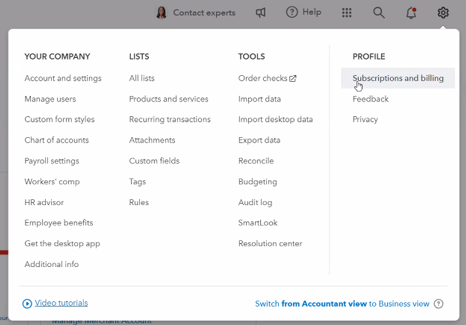
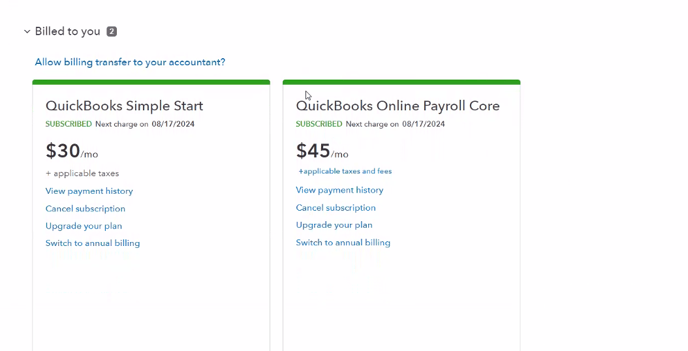
This is where we would see a list of your Quickbooks product subscriptions. All variations of "Quickbooks Online Payroll" is eligible to be set up with Payroll Integrations. Note, this is not the same as "Intuit Payroll" which is not eligible.
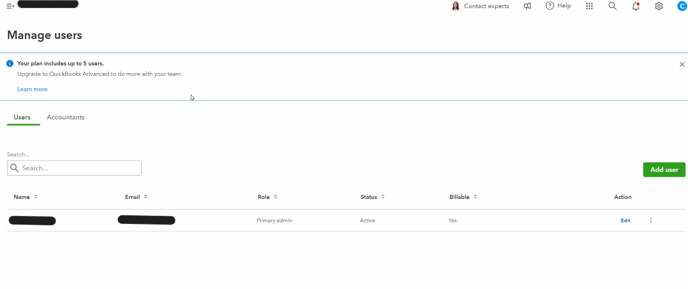
2. Check user permissions: User permissions can be found under "manage users" on the left hand column of Settings. You must connect to the Payroll Integrations application with a user that has "Admin" level permissions.
Contact Us

Submit a Ticket
Submit a ticket and our team will respond as soon as possible!

Chat With Us
