
How to add an additional user for ADP RUN Wholesale
This guide will walk you through the process of adding an additional user to a RUN Powered by ADP® (RUN) wholesale account to allow you to purchase our integration app in the ADP marketplace.
You must first create a new email account that is not tied to any other purchases for the ADP Marketplace. Once you have a separate email or you have a new email created, you can follow the steps below.
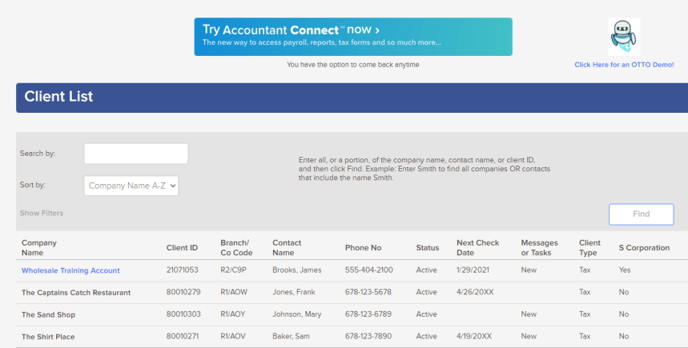
Step 1: Log into your regular ADP RUN wholesale & from the Firm View, select the child account you wish to purchase a solution for.
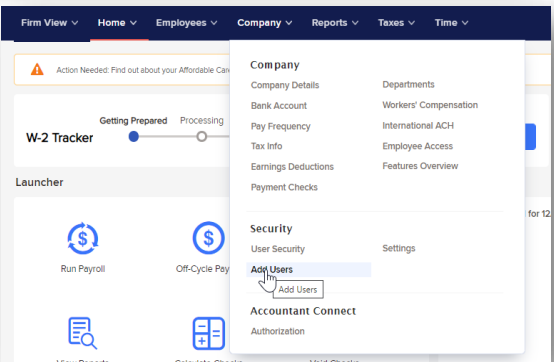
Step 2: Once in the child account, select Company > Add User.
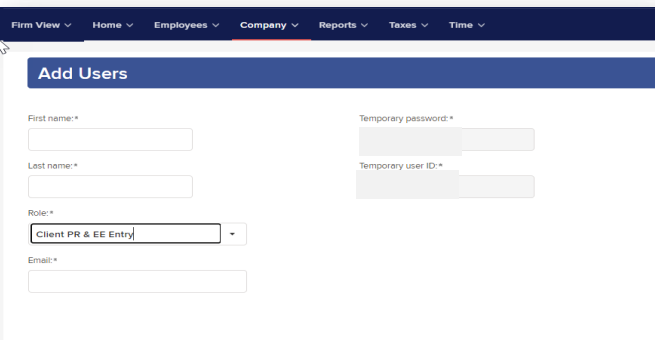
Step 3: Add the new user’s name and email and select Client PR & EE Entry under Role, then click Save.
Step 4: Follow the registration steps sent to the email entered to complete the new user setup process.
For any further assistance, please submit a help desk ticket here and we will get back to you as soon as possible.
Contact Us

Submit a Ticket
Submit a ticket and our team will respond as soon as possible!

Chat With Us
